
 Risk Management
There are various steps of risk management, i.e. Risk Register, Control Register (SOA) and Reporting.
Risk management has various steps from identification, analysis, evaluation & treatment (if required). Risk methodology explains the various steps.
Each risk goes through various stages depending on different fields.
Some fields are optional and are decided during setup by the administrator. It can be modified anytime to take effect.
Multiple roles are provided within Risk Management Module containing different access rights.
User rights are managed through User roles.
Once logged in your will directed to the dashboard. You should be able to click on any of the risk stages and view various statistics.
In addition, you can access filtered risks by clicking on widgets such as 'Total Risk,' 'Accept Risk,' and 'Pending Risk,' as well as the 'Accept vs Pending Risks' widget, to view corresponding subsets of risks.

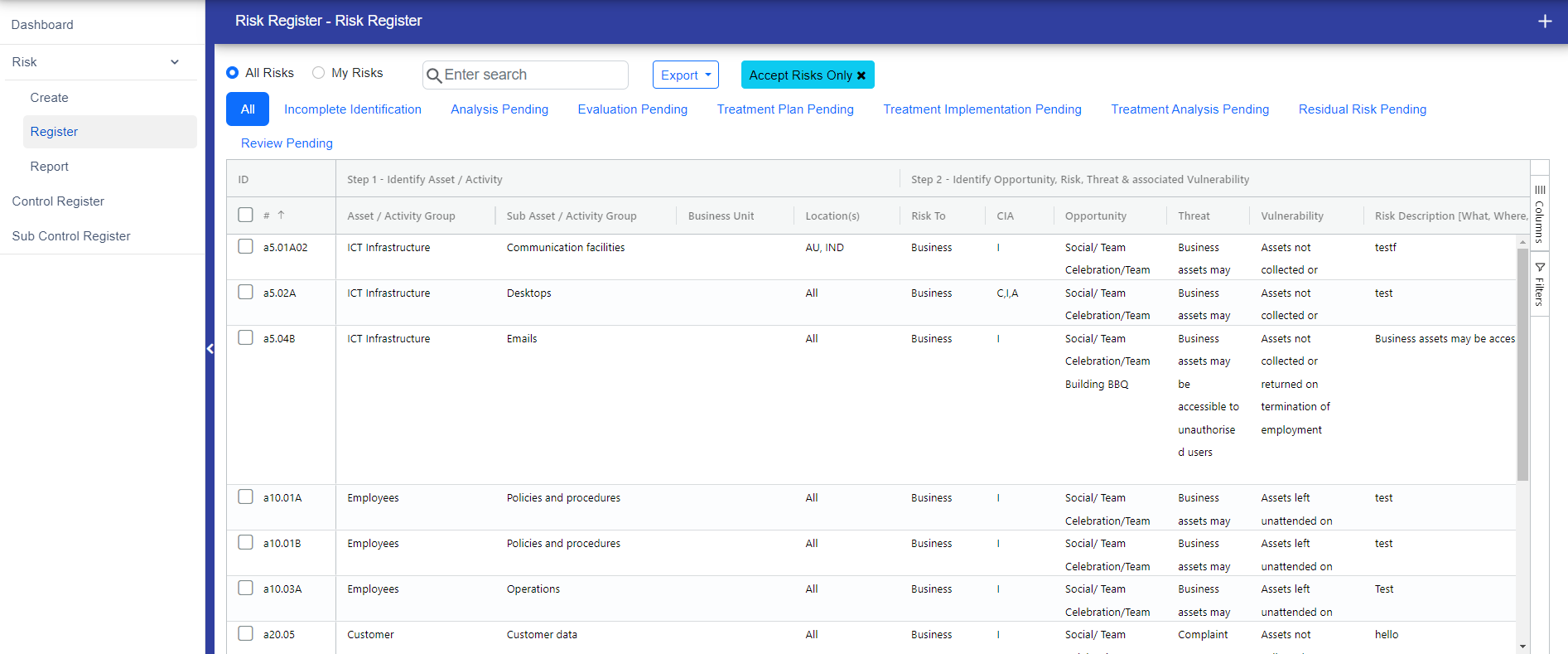
If you redirect to the risk register page through the dashboard, buttons will appear accordingly. For example, if you click on "Accept Risk," you will view only accepted risks, and a button will appear "Accept Risks Only". To clear the filter, simply click this button, and the data will be reset to its original state.
© Tofrum, 2024 • Updated: 27-2-2024
Comment or report problem with topic
